
Home » Artificial Intelligence » How to Write Prompts That Generate Clean, Production-Ready React Components

How to Write Prompts That Generate Clean, Production-Ready React Components

Developer using AI to generate production-ready React components with TypeScript and Tailwind CSS

The Gap Between What AI Generates and What Actually Ships

Every React developer has tried this at least once.

You open ChatGPT, type something like “write me a dropdown component in React,” and get back a block of code. It looks reasonable. You paste it into your project. Then you spend the next hour fixing prop issues, rewriting the styling logic, adding missing edge case handling, and wondering why the component does not integrate cleanly with the rest of your codebase.

You did not get a bad tool. You wrote a bad prompt.

The AI did exactly what you asked. The problem is that what you asked was vague, context-free, and incomplete. And vague prompts produce vague code — code that technically runs but is not production-ready, not scalable, and not consistent with your project’s standards.

This blog is about fixing that. You will learn exactly how to write prompts that generate clean, reusable, production-grade React components — the kind you can actually use without rebuilding them from scratch.

 Great React developers don’t just write better code—they write better prompts that generate better code

Why Most Developers Get Mediocre React Code From AI

When you prompt an AI tool without context, it defaults to the most generic interpretation of your request. It does not know your React version, your language choice, your styling approach, your state management setup, or your team’s naming conventions.

So it guesses. And it guesses generically.

The result is code that technically runs but does not belong in your codebase — wrong styling approach, different error handling patterns, conventions your team has already moved away from.

The fix is not a better AI. The fix is a better prompt — one that eliminates the guesswork by giving the model exactly the context it needs.

The Anatomy of a Production-Ready React Prompt

There are six elements every strong React component prompt needs. Miss any one of them and the output quality drops significantly.

1. Specify the React version and language

Always state whether you are using React 17, React 18, or higher, and whether the project is in JavaScript or TypeScript. These details change the output meaningfully — React 18 introduces concurrent features, and TypeScript requires interface definitions, typed props, and return types.

Example: “Using React 18 with TypeScript…”

2. Define the component type and structure

Tell the AI whether you want a functional component using hooks, a higher-order component, or a compound component pattern. If you want the component to be controlled or uncontrolled, say so. If it needs to use specific hooks like useCallback, useMemo, or useRef, include that.

Example: “Write a functional component using useState and useEffect. The component must be controlled — it should not manage its own state internally.”

3. Describe props with types and defaults

This is the most commonly skipped part, and it causes the most rework. Define every prop the component should accept, its type, whether it is required or optional, and its default value if applicable.

Example: “The component accepts the following props: items (array of objects with id: string and label: string, required), onSelect (function that receives the selected item, required), placeholder (string, optional, default: ‘Select an option’), disabled (boolean, optional, default: false).”

4. Specify the styling approach

Telling the AI your styling setup prevents it from generating inline styles when you use Tailwind, or class-based styles when you use styled-components. This one instruction alone saves significant cleanup time.

Example: “Use Tailwind CSS utility classes for all styling. Do not use inline styles or external CSS files.”

5. Include accessibility and edge case requirements

Production-ready components handle empty states, loading states, error states, and accessibility requirements. If you do not specify these, the AI will not include them. If you do specify them, you get a component that is genuinely complete.

Example: “The component must be keyboard-accessible, include an aria-label on the trigger button, handle an empty items array by displaying a ‘No options available’ message, and support a loading prop that shows a spinner in place of the list.”

6. Reference your existing patterns

If you want the new component to follow the same structure as your existing ones, paste a short example of an existing component from your project. This single addition dramatically improves consistency. The AI will mirror your naming conventions, your hook patterns, your export style, and your file structure.
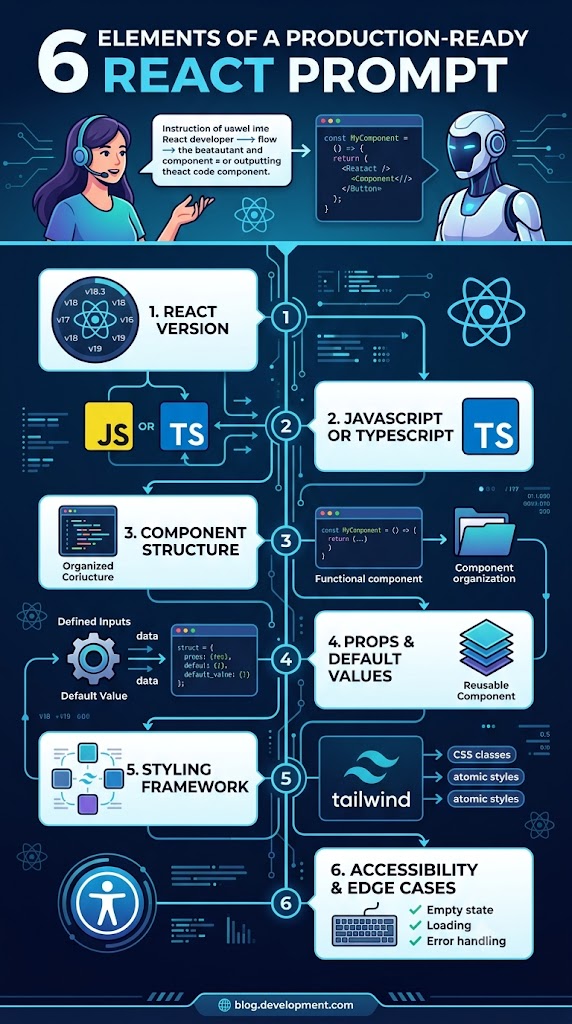
Infographic showing six essential elements required to generate production-ready React components using AI

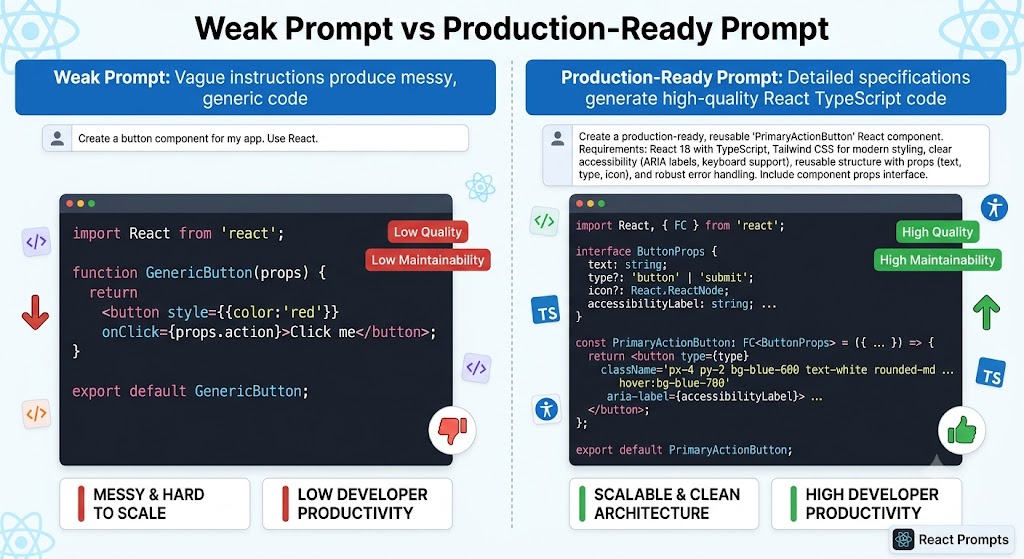
Full Example: Weak Prompt vs Production-Ready Prompt

Here is what the full difference looks like in practice.

Weak prompt: “Write a dropdown component in React.”

You get something generic — likely class-based, inline-styled, no TypeScript, no accessibility, no edge case handling. You will spend an hour fixing it.

Production-ready prompt: “Write a reusable dropdown component in React 18 with TypeScript. Functional and controlled. Props: options (array of objects with value: string and label: string, required), selectedValue (string or null, required), onChange (function receiving the selected value string, required), placeholder (string, optional, default: ‘Select’), disabled (boolean, optional, default: false), isLoading (boolean, optional, default: false). Use Tailwind CSS. Show a loading spinner when isLoading is true. Show ‘No options available’ when options is empty. Fully keyboard-accessible with proper aria attributes. Named export. No unnecessary re-renders.”

That prompt produces a component you can drop into a real project immediately types, accessibility, edge cases, and styling all handled because the prompt asked for each one.

The future belongs to developers who can combine coding expertise with AI-driven productivity. Start building those skills today

Prompts for Specific React Component Scenarios

Different component types need different prompt strategies. Here are the patterns that work for the most common scenarios.

Form components

Specify validation behavior, error display strategy, and submission handling.

Add to your prompt: “Use React Hook Form for validation. Show inline error messages below each field. Prevent submission while any field is invalid. On success, call the onSubmit prop with the form data object.”

Data display components

Specify how data is passed in, empty state behavior, and loading states.

Add to your prompt: “The component receives data as a prop — it does not fetch internally. Show a loading skeleton when isLoading is true. Show an empty state message when the data array is empty. No pagination — handled by the parent.”

Modal and dialog components

Modals need specific instructions around focus, keyboard behavior, and portal rendering.

Add to your prompt: “Trap focus within the dialog when open. Close on Escape key and backdrop click. Render via a React portal attached to document.body. Include open and onClose props.”

Custom hook extraction

Add to your prompt: “Separate into two files — the UI component and a custom hook with all state and handler logic. The hook returns only what the component needs to render.”

After the Output: How to Evaluate What AI Gives You

Generating a prompt is step one. Evaluating the output is step two — non-negotiable for any real project.

Before using AI-generated React code in your codebase, run through this checklist:

React version match? No deprecated APIs, legacy lifecycle methods, or outdated patterns.

TypeScript types complete? All props, return types, and event handlers correctly typed — nothing typed as any.

Edge cases handled? Test with an empty array, a null value, and the loading state before shipping.

Accessible? Verify aria attributes, keyboard navigation, and focus behavior.

Fits your conventions? Naming, file structure, export style, and hook patterns should match your team’s standards.

If anything fails, go back into the same conversation, tell the AI exactly what needs to change, and iterate. You are not starting over — you are refining. That is how professional developers use AI.

Today’s top developers don’t just write code—they know how to leverage AI to build better software faster

How Learn2Earn Labs Trains Developers to Write Better Prompts

At Learn2Earn Labs, students in the Full Stack Web Development (MERN) and React Native programs do not just learn to write React components — they learn to write the prompts that generate production-quality components and then evaluate and improve the output critically.

This is a real skill gap in the industry. Most developers can generate AI output. Far fewer can evaluate it, refine the prompt, and integrate it cleanly into a real codebase. That ability — AI fluency combined with technical judgment — is what hiring managers are actively looking for right now.

The training at Learn2Earn Labs is built around live projects, real codebases, and practical AI workflows. Students graduate with a portfolio of work that demonstrates not just what they built, but how they built it — including how they used AI tools intelligently and responsibly.

Beyond technical training, career counselling, mock interviews, placement support, and guidance on presenting AI skills to employers are all part of the program. With 12+ years of experience and alumni placed at companies including TCS, Accenture, Cognizant, and Nagarro, the outcomes speak for themselves.

If you are a developer ready to build React skills that are genuinely industry-ready — including the AI-integrated workflows that companies now expect — visit learntoearnlabs.com or write to team@learntoearnlabs.com to speak with a career counsellor.

Conclusion: The Component Quality Starts With the Prompt Quality

Clean, production-ready React components do not come from better AI. They come from better prompts.

When you give the AI your React version, your language, your prop definitions, your styling approach, your accessibility requirements, and your edge cases — you stop getting generic code that needs an hour of cleanup and start getting components that fit your project from the moment they are generated.

That shift in prompt quality is a shift in your development quality. It saves time, reduces bugs, builds consistency, and makes you the kind of developer who ships — fast, cleanly, and confidently.

Write better prompts. Build better components. And if you want structured, hands-on training in AI-integrated React development, Learn2Earn Labs is where that journey starts.

FAQ

Q1. What makes a React prompt production-ready?

A production-ready React prompt includes React version, language, props, styling framework, accessibility requirements, and edge-case handling.

Q2. Can ChatGPT generate React components with TypeScript?

Yes. By specifying TypeScript in your prompt, ChatGPT can generate typed props, interfaces, and strongly typed React components.

Q3. Why does AI sometimes generate poor React code?

Poor prompts lack context such as React version, component requirements, styling approach, and project conventions.

Q4. Should I use AI-generated React code directly in production?

No. Always review the code for TypeScript accuracy, accessibility, edge cases, performance, and project-specific conventions.

Q5. What styling framework should I mention in React prompts?

Specify Tailwind CSS, Styled Components, CSS Modules, Material UI, or your preferred styling solution to ensure consistent output.

Leave a Reply