Home » Prompt Engineering » How Developers Are Using GitHub Copilot Prompts to Build Features Faster

How to Use GitHub Copilot Prompts to Build Features Faster

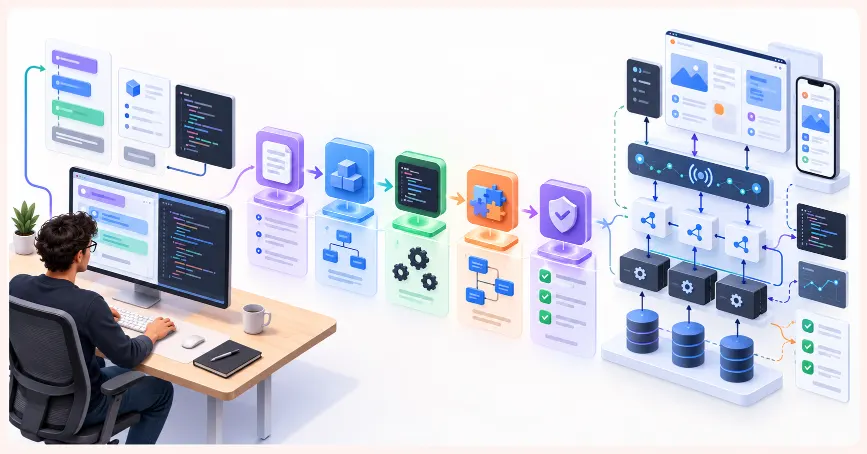
Developer using structured GitHub Copilot prompts for coding, testing, debugging and feature development

Half the time. The same quality. Here is what changes when you learn to use Copilot properly.

The developers who are getting the most from GitHub Copilot are not just faster at writing code. They are faster at building features — complete, tested, documented, production-ready features — because they have learned to use Copilot not as a code autocomplete tool but as a structured development collaborator.

The developer who opens a new file and starts typing, hoping Copilot will complete their thoughts, is using a fraction of the tool’s capability. The developer who writes deliberate, context-rich comments and function signatures that guide Copilot to produce specific, relevant, production-appropriate output — that developer is working fundamentally differently.

The gap between these two approaches is the difference between saving ten minutes and building a feature in half the time. It is almost entirely determined by how well the developer understands how to communicate with the tool.

This blog explains exactly how that communication works — the specific patterns, the concrete examples, and the workflow adjustments that produce consistent 50 percent time reductions on feature development.

Learn2Earn Labs AI Integrated Digital Marketing Training banner featuring AI-powered marketing skills, SEO, Google Ads, social media marketing, analytics, automation, practical projects, internship experience, and career-focused learning.

AI Integrated Digital Marketing Training

Build practical skills in SEO, Google Ads, Social Media Marketing, Analytics, Content Marketing, and AI-powered workflows through projects, live classes, internship exposure, and industry-focused learning.

Understanding what Copilot actually responds to

GitHub Copilot generates suggestions based on what it can see in its context window — the current file, related files visible through your IDE, and the specific structure of what you have written. It does not guess what you want. It infers from what you provide.

A developer who opens an empty function body and waits for Copilot to fill it is giving the tool almost nothing. A developer who writes a detailed comment above the function, defines the signature with precise parameter types, and adds setup code before the implementation is giving Copilot a structured brief — and the suggestion quality reflects it.

This is identical to the difference between a junior and senior developer’s prompts in ChatGPT. More context, better output. The difference with Copilot is that context is written in code and comments rather than a chat window.

Infographic showing how context, constraints and examples help GitHub Copilot generate more relevant code

Pattern 1: the context comment block

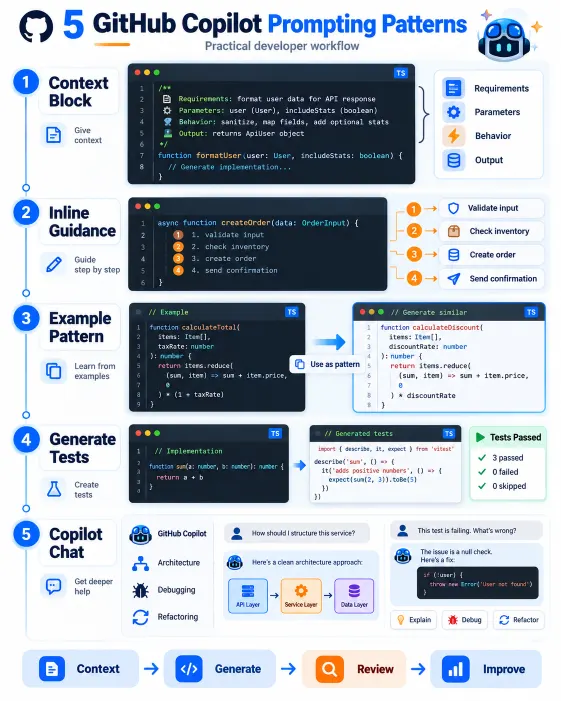
The most consistently effective technique: write a structured comment block at the top of any complex function or component before a single line of implementation.

Not just any comment — a structured brief that gives Copilot everything it needs:

/**
* Fetches paginated product listings with optional filtering and sorting.
*
* @param {Object} params - Query parameters
* @param {number} params.page - Zero-based page index
* @param {number} params.limit - Items per page (default 10, max 50)
* @param {string} [params.category] - Optional category filter
* @param {string} [params.sortBy] - Sort field: 'name' | 'price' | 'createdAt'
* @param {'asc' | 'desc'} [params.sortOrder] - Sort direction (default 'asc')
* @returns {Promise<{data: Product[], total: number, page: number, totalPages: number}>}
* @throws {ValidationError} if params are invalid
* @throws {DatabaseError} if the query fails
*/
async function fetchProducts(params) {

With this in place, Copilot has the parameter names, types, return structure, error types, and default behaviour. The suggestion is not generic pagination code — it is pagination code using these exact parameter names and returning this exact structure.

Write the comment first. Let Copilot write the implementation. This single habit changes suggestion quality more than any other technique.

Pattern 2: driving implementation with inline // comments

Inside a function body, inline comments describing what each section should do produce significantly better suggestions than waiting for Copilot to infer intent from prior code:

async function processOrderPayment(orderId, paymentDetails) {
// Retrieve the order and verify it exists and is in PENDING status
// Validate payment details and check card is not expired
// Calculate the final amount including tax (8.5%) and apply discount if order.discountCode exists
// Charge the payment provider - use stripe.charges.create with idempotencyKey = orderId
// If payment succeeds, update order status to PAID and set paidAt to current timestamp
// If payment fails, update order status to PAYMENT_FAILED and store the error message
// Send confirmation email using the existing emailService.sendOrderConfirmation method
// Return the updated order with payment status
}

Each inline comment becomes a prompt for the next code block. The developer writes pseudocode and Copilot translates it — and because each comment is specific, the translation is accurate.

Especially effective for: multi-step business logic workflows, error handling sequences, database operation sequences, and integration logic calling multiple external services.

Pattern 3: example-driven generation

For repetitive patterns — middleware, validators, API handlers — the fastest approach is showing Copilot one example and letting it complete the same pattern for similar cases:

// Middleware to validate that the requesting user owns the resource
// Pattern: check JWT userId matches resource.userId, throw 403 if not

// Example for Product resource:

const validateProductOwnership = async (req, res, next) => {
const product = await Product.findById(req.params.id);
if (!product) return res.status(404).json({ success: false, message: 'Product not found' });
if (product.userId.toString() !== req.user.id) {
   return res.status(403).json({ success: false, message: 'Access denied' });
}
req.product = product;
next();
};

// Now generate the same middleware for Order resource:

const validateOrderOwnership =

Copilot generates the complete middleware using the same structure, error format, and logic — adapted to the Order model. This pattern saves disproportionate time in any project where the same structural pattern repeats across multiple resources, which is most real projects.

AI Integrated Full Stack Development training with React Node.js MongoDB and AI tools at Learn2Earn Labs

AI Integrated Full Stack Development Training

Master HTML, CSS, JavaScript, React, Node.js, Express.js, MongoDB, REST APIs, and AI-powered development workflows through live coding, practical projects, internship opportunities, and career-focused training.

Pattern 4: test generation from implementation

Copilot handles test generation remarkably well when given the right context:

// Unit tests for the fetchProducts function
// Test cases to cover:
// 1. Returns correct data structure when called with valid params
// 2. Applies category filter correctly when params.category is provided
// 3. Uses default page=0 and limit=10 when not provided
// 4. Throws ValidationError when limit exceeds 50
// 5. Sorts by createdAt descending when sortBy=createdAt and sortOrder=desc
// 6. Returns empty data array and total=0 when no products match filter
// Using Jest with mock for the database layer
describe('fetchProducts', () => {

With the function to test, an explicit test case list, the testing library, and mocking approach all specified, Copilot generates a complete, structured test suite. Each comment becomes a test block with the correct arrange-act-assert structure — and the file needs minimal editing before it runs.

Pattern 5: Copilot chat for architecture and refactoring decisions

GitHub Copilot Chat — available in VS Code and JetBrains — allows conversational interaction with the codebase and is where the most significant time savings come from on complex development work.

For architecture: “What are the trade-offs between storing refresh tokens in the database versus Redis for this authentication flow?” — with the auth service file open — produces contextual analysis informed by the actual code, not a textbook answer.

For refactoring: select a code block, ask “Refactor this to follow the repository pattern. Extract data access into ProductRepository. Keep the existing interface intact.” The result is a concrete, applicable plan.

For debugging: paste the error and relevant code, ask “What is causing this CastError given this schema structure?” The diagnosis is targeted to the actual schema visible in the file.

The principle is the same as every other pattern: the more specific the context provided, the more directly applicable the response.

What this looks like in a real development day

Here is the practical difference for a single feature: build a product search endpoint with autocomplete suggestions.

Without Copilot fluency: think through the MongoDB aggregation pipeline, write it manually, add response formatting, write Postman tests by hand, add Swagger annotations. Estimated: four to five hours.

With Copilot fluency: write the context comment block, use inline comments for each aggregation step, let Copilot generate the implementation, add the test case comment list, let Copilot generate tests, prompt Copilot to add Swagger annotations matching the existing pattern. Estimated: ninety minutes to two hours.

Every step still happens. The saving comes from eliminating the mechanical translation work — syntax, boilerplate, repetitive structural code — so the developer focuses on decisions that actually require judgment.

Infographic showing five GitHub Copilot prompting techniques for coding, testing, refactoring and debugging
Student learning React Native mobile app development with AI, Expo, APIs, and practical projects at Learn2Earn Labs.

AI Integrated React Native Mobile App Development Training

Build a job-ready mobile app development profile through practical coding, industry-style projects, AI-assisted workflows, career preparation, mentor-guided learning, real-world app deployment, API integration, and hands-on portfolio development.

How Learn2Earn Labs builds GitHub Copilot fluency into technical training

At Learn2Earn Labs, GitHub Copilot is not introduced in a demo session and left to figure out. It is a working tool used across every live project in the Full Stack Web Development, React Native, Java Full Stack, and other technical programs — with the five patterns described in this blog practised deliberately from the first week.

Students write context comment blocks before implementations, use inline comments to drive complex logic, use example-driven generation for repetitive patterns, and use Copilot Chat for architecture decisions — as part of the standard workflow, not optional extras.

Instructors review how students use Copilot, not just what they produce. Vague context comments that produce weak suggestions are flagged with specific feedback on what was missing and why the suggestion suffered.

Career counselling prepares students to demonstrate their Copilot workflow in technical interviews — because companies right now want to know not just whether candidates use AI tools but how well they use them.

With alumni placed at TCS, Accenture, Cognizant, Infosys, and Nagarro, and with decades of experience preparing developers for India’s job market, Learn2Earn Labs trains every student to work at the productivity level the market is beginning to expect from every candidate.

Visit learntoearnlabs.com or write to team@learntoearnlabs.com

Conclusion

GitHub Copilot does not make developers faster by completing their sentences. It makes developers faster when they learn to write context-rich, structured guidance that tells Copilot exactly what to build — and then spend their own time on the judgment and verification that AI cannot replicate.

The five patterns in this blog — context comment blocks, inline comment driving, example-driven generation, test generation from specifications, and Copilot Chat for architecture decisions — are not tricks. They are a professional development workflow, built around the understanding that the quality of what Copilot produces is directly determined by the quality of what you put in.

Start using them on your next feature. The time difference will be visible before the week is out.

Frequently Asked Questions

1. How do I use GitHub Copilot more effectively?

Use GitHub Copilot with clear context instead of relying only on autocomplete. Define function signatures, write structured comments, specify expected behaviour and edge cases, provide examples of existing patterns, and review every generated suggestion before integrating it into your code.

2. What are GitHub Copilot prompts?

GitHub Copilot prompts are instructions or contextual signals that help Copilot understand what code you want. Depending on the workflow, these can include comments, function signatures, existing code patterns, selected code, natural-language instructions, or conversational requests through Copilot Chat.

3. Can GitHub Copilot help developers build features faster?

GitHub Copilot can reduce time spent on repetitive coding, boilerplate, tests, common implementation patterns, and refactoring when it is given sufficient context. The actual time saved varies by task, codebase, developer experience, and how carefully the generated code is reviewed.

4. How can developers use GitHub Copilot for testing?

Developers can describe the test cases, expected behaviour, edge cases, testing framework, and mocking strategy before asking Copilot to generate tests. Providing an explicit test-case list helps Copilot produce a more structured test suite that can then be reviewed and executed.

5. What information should I give GitHub Copilot before generating code?

Provide the task objective, relevant code or project context, function or component signature, input and output expectations, constraints, edge cases, existing coding patterns, and any libraries or frameworks that should be used. More relevant context generally makes the suggestion more applicable to the codebase.