Junior vs Senior Developer Prompts: How to Write Better AI Prompts
Table of Contents
ToggleThe same AI tool. The same task. Completely different output. Here is why.
Two developers open ChatGPT to solve the same problem: build a user authentication system with JWT.
The junior developer types: “Write a JWT authentication system in Node.js.”
The senior developer types something significantly longer — includes the existing middleware structure, specifies token expiry requirements, names the error handling pattern already in use, and asks for output in the format that matches the codebase.
Twenty minutes later, the junior developer is rewriting most of what the AI gave them. The senior developer integrated the output with two minor edits.
Same tool. Same AI. Completely different result — not because one is smarter, but because one understands something fundamental: the quality of what comes out is a direct function of the quality of what goes in.
This blog breaks down, with concrete before-and-after examples across four real development scenarios, exactly what makes a senior developer’s prompt produce better output — and how any developer can start prompting at that level right now.
AI Integrated Digital Marketing Training
Build practical skills in SEO, Google Ads, Social Media Marketing, Analytics, Content Marketing, and AI-powered workflows through projects, live classes, internship exposure, and industry-focused learning.
Why experience changes how developers use AI
Senior developers do not just know more code. They think differently about problems.
When a junior developer faces a task, they think about it as a single problem to solve. A senior developer thinks about it in context: how does this fit the existing architecture, what edge cases will production surface, what are the security implications, and what format does the output need to be in to integrate cleanly with the rest of the codebase.
That contextual thinking — applied to a prompt — is what produces better AI output.
The AI is not smarter when a senior developer uses it. It has more to work with. It knows the architecture, the constraints, the expected format. It has been given what it needs to generate something that fits rather than something generic.
The good news: this is entirely learnable. You do not need years of experience to prompt like a senior. You need to understand what contextual information matters and how to include it.
Example 1: building an API endpoint
Junior developer’s prompt
"Write an Express.js route that creates a new user."
What the AI produces: A basic route handler, minimal validation, no consistent error handling, response format that matches nothing else in the project.
Time spent after: 30 to 45 minutes rewriting and reformatting.
Senior developer’s prompt
“Write an Express.js POST route for user registration with this context:
express-async-errors for automatic async error handling
Joi for request body validation
bcryptjs with saltRounds of 12
AppError instances with message and statusCode for all errors
Response format: { success: boolean, message: string, data: any }User model: email (unique), passwordHash, role (enum: user, admin), createdAt
The route should: validate email format and minimum 8-character password, return 409 if email exists, hash the password, create the user, and return the created user excluding passwordHash. Follow the thin controller pattern that delegates to a service layer.”
What the AI produces: A route integrating with existing patterns, established error handling, correct validation library, expected response format.
Time spent after: Under five minutes.
What made the difference: Architecture context, existing patterns, validation library, error approach, response format, field exclusion — none inferred without being told.
Example 2: debugging a production error
Junior developer’s prompt
"I'm getting a CastError in Mongoose. How do I fix it?"
What the AI produces: A generic explanation of CastError, common causes, general solutions. Useful as education. Rarely directly applicable.
Senior developer’s prompt
“I am getting the following Mongoose CastError in production:
CastError: Cast to ObjectId failed for value 'undefined' at path '_id' for model 'Product'
Here is the route where it occurs:
router.get('/products/:id', async (req, res) => {
const product = await Product.findById(req.params.id);
res.json({ success: true, data: product });
});
The error only occurs intermittently — roughly 1 in 20 requests. The endpoint receives valid product IDs from the frontend in normal usage.
I suspect the issue might be related to how the ID is passed in certain edge cases, but I cannot reproduce it locally. Please: identify the most likely root cause of this intermittent failure, explain why it produces a CastError specifically, provide the corrected route with validation added, and suggest what I should add to the error logging to capture more context the next time it occurs.”
What the AI produces: Targeted diagnosis of the specific error, a corrected route with ID validation, and specific logging recommendations. Directly actionable.
What made the difference: Exact error message, relevant code, frequency pattern, formed hypothesis, and specific outputs requested.
Example 3: React component generation
Junior developer’s prompt
"Write a React dropdown component."
What the AI produces: A self-contained dropdown with inline styles, no accessibility, no alignment with any project’s patterns. Looks fine in isolation. Fits nowhere specific.
Senior developer’s prompt
"Write a controlled dropdown component for React 18.
Controlled — parent manages open/close state via isOpen and onOpenChange props
Props: options ({ value: string, label: string }[]), value (string|null), onChange (fn), placeholder (string, default 'Select an option'), disabled (bool, default false), isLoading (bool, default false)Tailwind CSS only — no inline styles
isLoading: show spinner in trigger instead of current value
Empty options: show 'No options available'
Keyboard: Enter/Space opens, arrow keys navigate, Escape closes
Accepts className prop for external customisation
Named export"
What the AI produces: Fully controlled, keyboard-accessible, Tailwind-styled dropdown handling all edge cases. Ready to integrate.
What made the difference: Controlled vs uncontrolled, exact prop names, styling approach, four edge cases, accessibility, state ownership — all defined before the AI began.

AI Integrated Full Stack Development Training
Master HTML, CSS, JavaScript, React, Node.js, Express.js, MongoDB, REST APIs, and AI-powered development workflows through live coding, practical projects, internship opportunities, and career-focused training.
Example 4: code refactoring
Junior developer’s prompt
"Refactor this code to make it better."
What the AI produces: Whatever “better” means to the AI — which may or may not match what the developer needed. Unknown scope. Unknown standards.
Senior developer’s prompt
“Refactor the following Node.js service function to improve its quality. Here is the code:
[paste code]
Specific goals for this refactoring:
Extract the database operations into separate private helper functions to improve readability
Replace the nested if-else chains with early returns (guard clauses)
Add JSDoc comments to the main function and each helper
The error handling should throw AppError instances — do not change the error handling pattern, only how errors are structured if they currently use plain Error
Do not change the external interface of the function — the parameters and return value must remain the same
Do not change any business logic — only the structure and documentation
After the refactored code, list each change you made and the reason for it.”
What the AI produces: A precisely scoped refactoring — guard clauses, extracted helpers, documentation — without changing interface or business logic. Every change explained.
What made the difference: Five bounded goals, two explicit constraints, and a request for change documentation. The AI cannot guess what “better” means. Tell it exactly what better means and it produces exactly that.
The pattern behind every senior prompt
The same structural differences appear across every example.
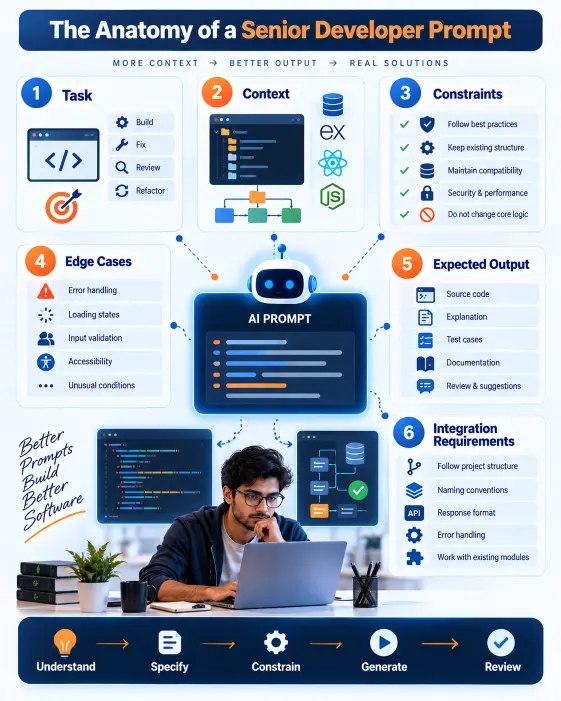
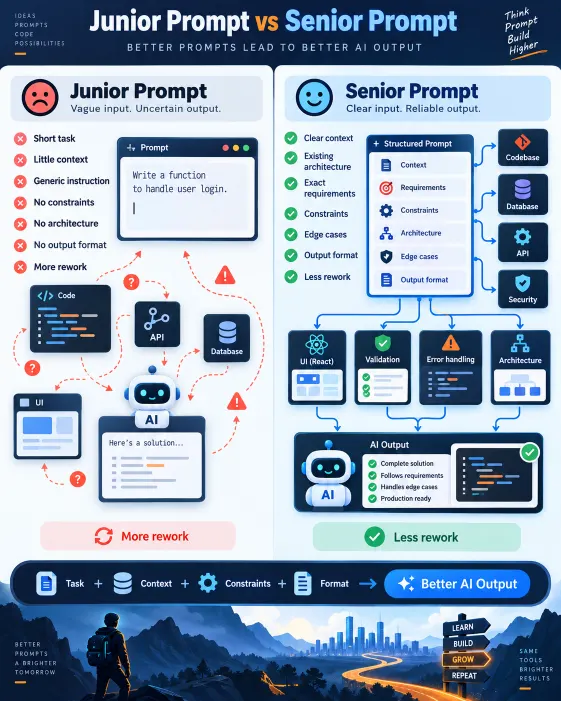
A junior developer’s prompt describes the output they want. A senior developer’s prompt describes the output they want plus the context it needs to fit into, the constraints it must respect, and the format it needs to arrive in.
Junior: “Write a function that sends email.”
Senior: “Write a function that sends a transactional email using Nodemailer. Accept { to, subject, htmlBody }. Use the transport instance from src/config/mailer.js. Re-throw errors as AppError with statusCode 503. Async, returns void on success.”
Junior: “Fix this bug.”
Senior: “Error: [message]. Code: [code]. Expected: [behaviour]. Actual: [behaviour]. Already tried: [attempts]. Diagnose root cause, explain it, provide the fix, flag any other places this pattern could cause the same issue.”
The senior developer has not done more work. They have done different work — thinking through context, constraints, and output requirements before asking the AI to write anything.
This is a thinking habit as much as a prompting skill. Build it deliberately, and the prompts follow naturally.
AI Integrated React Native Mobile App Development Training
Build a job-ready mobile app development profile through practical coding, industry-style projects, AI-assisted workflows, career preparation, mentor-guided learning, real-world app deployment, API integration, and hands-on portfolio development.
How Learn2Earn Labs builds this thinking from the start
At Learn2Earn Labs, the distinction between junior and senior-level prompting is built into how students learn to use AI tools throughout the Full Stack Web Development, React Native, and other technical programs.
Students do not just learn to generate code with AI. They learn to write structured prompts for real features — with context, constraints, existing patterns, and output format requirements. Every prompt is reviewed for completeness: did the student include the architecture context? Did they specify the error handling approach? Did they set explicit constraints?
This deliberate practice accelerates two things simultaneously: better AI fluency and better technical thinking — because the discipline of specifying context and constraints before writing a prompt is the same discipline that produces better architecture decisions, code reviews, and debugging instincts.
Career counselling at Learn2Earn Labs prepares students to demonstrate this fluency in interviews — because hiring managers at product companies and startups are increasingly asking candidates to walk through how they work with AI, not just whether they use it.
With alumni placed at TCS, Accenture, Cognizant, Infosys, and Nagarro, and with decades of experience shaping developer careers in India, Learn2Earn Labs builds every student’s capability to be on the right side of the skill gap that is already widening.
Visit learntoearnlabs.com or write to team@learntoearnlabs.com
Conclusion
The AI does not know your codebase, your team’s patterns, your error handling approach, or your edge cases. It knows only what you tell it.
A junior developer’s prompt gives the AI a task. A senior developer’s prompt gives the AI a task plus everything it needs to complete that task well.
The difference in output is not the AI’s capability. It is the quality of the briefing.
Start prompting like a senior — not by knowing more, but by writing down more of what you already know before you hit send.
Frequently Asked Questions
1. What is the difference between a junior and senior developer prompt?
A junior developer prompt often describes only the task, while a senior developer prompt also includes technical context, architecture, constraints, edge cases, existing project patterns, and the expected output format. This gives the AI more information to generate code that fits the actual application.
2. How can developers write better AI prompts?
Developers can write better AI prompts by clearly defining the task, providing relevant code and project context, specifying libraries and architecture, stating constraints, identifying edge cases, and explaining the expected output. The more precise the briefing, the more useful the AI response is likely to be.
3. Do senior developers get better results from ChatGPT?
They can often get more relevant results because they tend to provide more technical context and clearer requirements. The AI itself is not different, but the quality of the information supplied to it can make the response more specific and easier to integrate into an existing codebase.
4. What should a developer include in a coding prompt?
A strong coding prompt should include the task, technology stack, relevant code or architecture, project conventions, constraints, edge cases, expected behaviour, and desired output format. For debugging, it should also include the exact error, expected result, actual result, and previous attempts.
5. Can junior developers learn to prompt like senior developers?
Yes. Senior-level prompting is largely a structured thinking habit. Junior developers can improve by learning to think about architecture, context, constraints, integration requirements, security, validation, and edge cases before asking an AI tool to generate code.