Home » Prompt Engineering » Prompt Templates Every MERN Stack Developer Should Save Right Now

10 Powerful Prompt Templates Every MERN Stack Developer Should Use

Developer using AI prompts to build and debug a MERN stack application

These are not generic AI tips. These are the exact prompts that save MERN developers hours every week.

Most AI advice for developers is vague. “Use ChatGPT to write code faster.” “GitHub Copilot will help.” None of that tells you what to actually type.

The developers getting the most from AI tools are using the same platforms everyone has access to — but with prompts that are specific, structured, and built around the exact context of their work. The difference between a prompt that produces mediocre output and one that produces production-grade code is almost entirely in the quality of the instruction.

This blog gives you the actual prompt templates — for MongoDB schema design, Express route building, React component generation, Node.js API development, authentication, and debugging — that MERN developers use daily to cut development time, reduce errors, and produce code that belongs in a real project.

Save these. Adapt them. Use them every day.

Learn2Earn Labs AI Integrated Digital Marketing Training banner featuring AI-powered marketing skills, SEO, Google Ads, social media marketing, analytics, automation, practical projects, internship experience, and career-focused learning.

AI Integrated Digital Marketing Training

Build practical skills in SEO, Google Ads, Social Media Marketing, Analytics, Content Marketing, and AI-powered workflows through projects, live classes, internship exposure, and industry-focused learning.

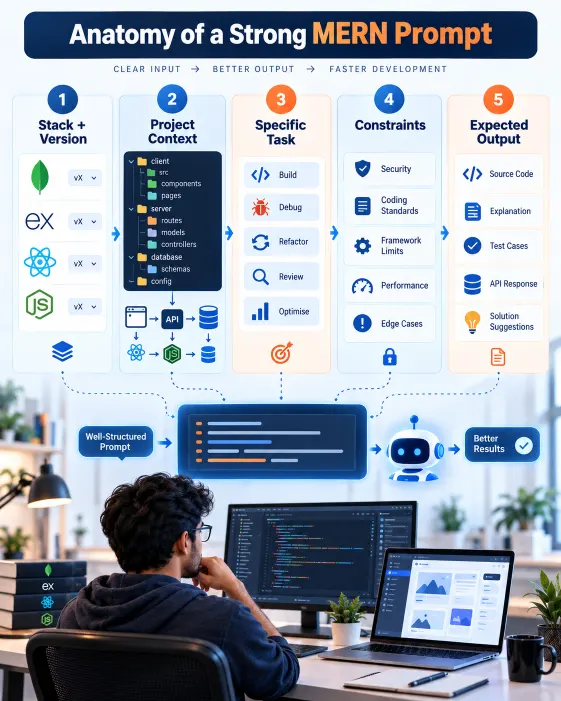
Infographic showing stack, context, task, constraints and output as parts of an effective MERN prompt

Before the templates: what makes a MERN prompt work

A weak prompt gives the AI no context and produces generic output. A strong prompt gives five things: the stack and version, the existing context, the specific task, the constraints, and the expected output format.

Every template here is built on that structure. When you adapt them, preserve all five elements — remove any one and output quality drops noticeably.

These templates work best in conversation, not as single one-shot prompts. The first output is a starting point. Iteration is where the code becomes yours.

MongoDB schema design templates

Template 1: designing a schema from scratch

When to use: Starting a new feature and designing the Mongoose schema before any logic.

Building a [application description] using MongoDB and Mongoose.

I need a schema for [entity, e.g. “user profile with role-based access”].

Requirements:

- [Each field, its type and purpose]
- [Relationships to other collections]
- [Validation requirements]
- [Indexing needs]

Create a Mongoose schema with appropriate validators, timestamps enabled, required indexes, a comment per field, and a model export.

Template 2: optimising an existing schema

When to use: You have an existing schema that is performing poorly or missing important features.

I have an existing Mongoose schema that I need to improve. Here it is:

[Paste your existing schema]

The main issues I am facing:

- [Describe performance problems, e.g. "slow queries when filtering by status and date"]
- [Describe missing features, e.g. "no soft delete support"]
- [Describe validation gaps]

Please refactor this schema to address these issues and explain each change you make and why it improves the design.

Express.js route and middleware templates

Template 3: building a complete REST API route set

When to use: You need to scaffold all CRUD routes for a resource quickly.

I am building a REST API using Node.js and Express.js.

I need complete CRUD routes for a [resource name] resource.

Context:

- Mongoose model imported as [ModelName]
- JWT middleware already applied to the router
- Using async/await with express-async-errors

Generate:

- GET /[resource] — pagination with page and limit query params
- GET /[resource]/:id — 404 handling if not found
- POST /[resource] — validation error handling
- PUT /[resource]/:id — 404 and validation handling
- DELETE /[resource]/:id — soft delete with isDeleted flag

Consistent response structure: { success: boolean, data: any, message: string }

Template 4: custom middleware

When to use: Writing reusable middleware for role checking, rate limiting, or request logging.

Write an Express.js middleware for [describe purpose].

Context:

- JWT payload: { userId, email, role }
- Reusable, accepts required role as a parameter
- Usage: router.get('/admin-route', checkRole('admin'), controller)
- On failure: return 403 with { success: false, message: 'Access denied' }

Include usage example in a route file.

React component templates

Template 5: generating a complete, production-ready component

When to use: You need a complete, modern React component with hooks, props, and edge case handling.

React 18 application using JavaScript (not TypeScript).

I need a [component name] component.

- Purpose: [what it does]
- Props: [each prop, type, required/optional, default value]
- State: [internal state requirements]
- Side effects: [useEffect needs, API calls, subscriptions]
- Styling: [Tailwind CSS / CSS modules / styled-components]
- Edge cases: [loading / empty / error states]

Generate:

  1. Complete component with hooks and logic
  2. PropTypes definition
  3. Named export
  4. Comments on any non-obvious logic
AI Integrated Full Stack Development training with React Node.js MongoDB and AI tools at Learn2Earn Labs

AI Integrated Full Stack Development Training

Master HTML, CSS, JavaScript, React, Node.js, Express.js, MongoDB, REST APIs, and AI-powered development workflows through live coding, practical projects, internship opportunities, and career-focused training.

Template 6: converting a class component to a functional component

When to use: You have legacy class components to modernise.

Convert this React class component to a functional component using hooks.

[Paste your class component]

– Convert lifecycle methods to useEffect hooks
– Convert this.state to useState
– Preserve all existing functionality exactly
– Keep the same prop and variable names where possible
– Comment any non-obvious conversion decisions

Node.js and API integration templates

Template 7: building a service layer function

When to use: Separating business logic from route handlers using a service layer pattern.

I am building a service layer function for a Node.js Express application.

The function handles: [describe the business operation]

Context:

- Mongoose for database operations
- Nodemailer for email sending
- Use Mongoose transactions if multiple DB operations are involved
- Throw errors as custom AppError instances with a statusCode property

Write the service function with:

- Full async/await error handling
- Transaction setup where needed
- Clear step separation
- JSDoc comment at the top

Template 8: debugging an API error

When to use: You are getting an API error and need targeted diagnostic help.

Diagnosing an error in my MERN stack application.

Error: [exact message and stack trace]
Route handler: [paste code]
Mongoose model: [paste schema]
Expected: [describe expected behaviour]
Actual: [describe actual behaviour]
Already tried: [what you have attempted]

Please:

  1. Identify the most likely cause
  2. Explain why it occurs
  3. Provide corrected code
  4. Flag any other places in the codebase with the same issue

Authentication and security templates

Template 9: JWT authentication setup

When to use: Implementing JWT-based authentication with a complete, secure setup.

I need to implement JWT authentication in a Node.js Express application.

Requirements:

- User model: email, bcrypt-hashed password, role (user/admin)
- Login returns: accessToken (15 min) and refreshToken (7 days)
- Refresh token route issues new accessToken from valid refreshToken
- Logout invalidates the refreshToken in the database
- Refresh tokens stored in DB, not only client-side

Generate:

  1. Auth service: generateTokens, verifyToken, refreshToken functions
  2. Auth middleware for route protection
  3. Login, refresh, and logout route handlers
  4. Brief security note for each decision

Code review and quality templates

Template 10: AI-assisted code review before submission

When to use: Before pushing to a repository or submitting for peer review.

Review the following MERN stack code as a senior developer before a pull request approval.

[Paste the code]

Focus on:

  1. Security vulnerabilities (injection, improper auth, data exposure)
  2. Performance (unnecessary DB calls, missing indexes, inefficient queries)
  3. Error handling gaps (unhandled rejections, missing validation)
  4. Code quality (naming, readability, unnecessary complexity)
  5. Missing edge cases that could cause production bugs

For each issue: specific line, why it’s a problem, corrected version.
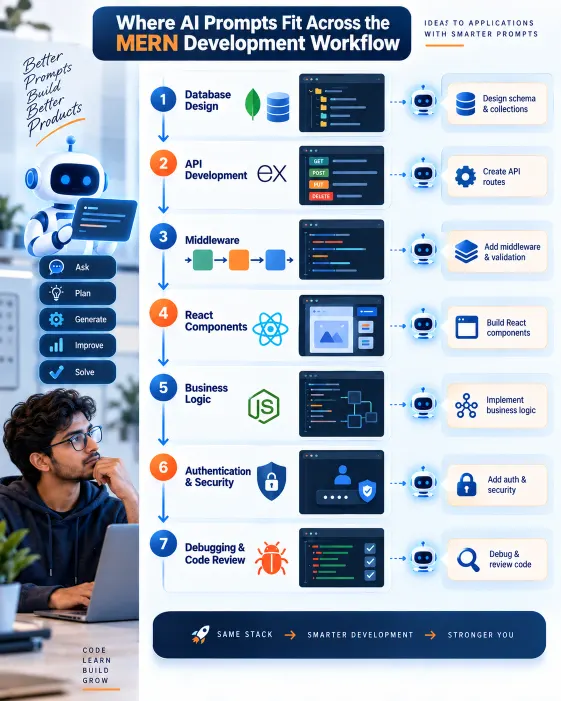
Infographic showing how AI prompts support database design, APIs, React, authentication, debugging and code review in MERN development

How to get more from these templates

Add project context before every session. At the start of a new chat, paste a brief description of your project — the stack, application type, architecture patterns, and team conventions. Everything that follows in that session will be more aligned with your actual codebase.

Iterate rather than accept. Follow up with: “The validation logic needs to handle [edge case],” or “Refactor this to use the repository pattern I showed you,” or “This conflicts with my error handler — here it is: [paste code].” The conversation is where the code matures.

Build a personal prompt library. When a prompt produces exactly what you needed, save and annotate it. Over time this becomes a toolkit that compounds in value — you are never starting from scratch on a problem you have solved before.

Student learning React Native mobile app development with AI, Expo, APIs, and practical projects at Learn2Earn Labs.

AI Integrated React Native Mobile App Development Training

Build a job-ready mobile app development profile through practical coding, industry-style projects, AI-assisted workflows, career preparation, mentor-guided learning, real-world app deployment, API integration, and hands-on portfolio development.

How Learn2Earn Labs trains developers to build this fluency

At Learn2Earn Labs, prompt engineering for MERN stack development is not a separate module — it is how development is practised from week one. Students build features on live projects with ChatGPT and GitHub Copilot as active collaborators, write structured prompts for real debugging scenarios, use AI for code reviews before instructor review, and progressively build the personal prompt library this blog describes.

The outcome is graduates who arrive at their first job already fluent — with a working prompt library calibrated to MERN development, the critical evaluation habits to assess AI output correctly, and the interview confidence to demonstrate this when asked.

Career counselling at Learn2Earn Labs prepares students to articulate their AI-integrated workflow in interviews — because in the current market, this is becoming as important as describing the projects themselves.

With alumni placed at TCS, Accenture, Cognizant, Infosys, and Nagarro, and with decades of experience shaping developer careers in India, Learn2Earn Labs trains every student to be ahead of the market rather than catching up to it.

If you want to build MERN stack skills with AI fluency integrated from the start — speak with the team at Learn2Earn Labs.

Visit learntoearnlabs.com or write to team@learntoearnlabs.com

Conclusion

The difference between a developer who uses AI and one who uses AI well is the quality of the prompts they write.

These ten templates cover the most common, most time-consuming tasks in MERN stack development. Save them. Adapt them to your specific project context. Keep the five-element structure — stack, context, task, constraints, output format — intact when you modify them.

Then build the habit of iteration. The first output is rarely the final one. The conversation is where development happens.

The developers who build this practice now are the ones who will be significantly more productive, more hireable, and better compensated a year from now.

Start saving.

Frequently Asked Questions

1. What are MERN stack prompt templates?

MERN stack prompt templates are reusable structured instructions designed for AI tools such as ChatGPT to assist with MongoDB, Express.js, React, and Node.js development tasks. They can be adapted for schema design, APIs, components, debugging, authentication, code review, and other development activities.

2. How should I write a good prompt for MERN stack development?

A strong MERN stack prompt should include the technology stack and version, relevant project context, the specific task, important constraints, and the expected output format. Providing these details helps an AI tool generate responses that are more relevant to the actual project.

3. Can ChatGPT help with MERN stack development?

Yes. ChatGPT can assist MERN developers with tasks such as designing Mongoose schemas, creating Express routes, generating React components, writing Node.js services, debugging API errors, reviewing code, and explaining possible solutions. AI-generated code should still be reviewed, tested, and validated by the developer.

4. What are the best AI prompts for MERN developers?

Useful MERN prompts include templates for MongoDB schema design, REST API creation, Express middleware, React component development, Node.js service layers, debugging, JWT authentication, security reviews, and pre-pull-request code reviews.

5. Should MERN developers save their best prompts?

Yes. Developers can build a personal prompt library by saving prompts that consistently produce useful results. These templates can then be adapted to new projects, coding standards, architectures, edge cases, and development requirements instead of starting from scratch each time.