How to Use ChatGPT to Debug Code Faster Than Stack Overflow Ever Could
Table of Contents
ToggleEvery Developer Knows This Feeling
You have been staring at the same error for 45 minutes. You have read the error message ten times. You have searched Stack Overflow, opened four threads, and not one of them matches your exact situation. The accepted answers are from 2016. Half the suggested fixes require a library version you are not using. One comment thread turned into an argument.
You are no closer to solving the problem than when you started.
This is not a rare experience. It is the daily reality for developers at every level — freshers stuck on their first project, mid-level developers dealing with complex integration bugs, senior engineers tracking down edge-case failures in production.
Stack Overflow built careers for a generation of developers. But in 2025, there is a faster, smarter, and more personalized way to debug code — and it is called ChatGPT.
This blog will show you exactly how to use ChatGPT to debug code effectively, what makes it so much faster than traditional methods, the prompts that actually work, and the mistakes that waste your time.
Master the skills companies hire for and build real-world web applications from day one
Why ChatGPT Beats Stack Overflow for Debugging
Before getting into the how, it is worth understanding the why — because the structural advantages are significant.
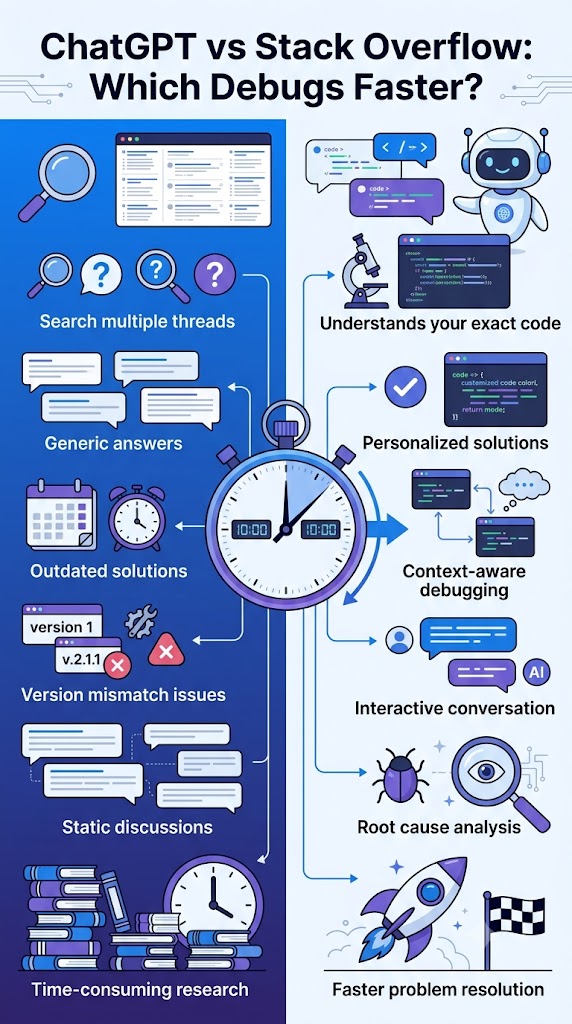
Stack Overflow gives you someone else’s answer to someone else’s problem. Your framework version, your project structure, your specific combination of packages — none of that is accounted for. You spend more time translating a generic answer to your situation than actually fixing the bug.
ChatGPT works with your code, your error, your context. When you paste your actual code and error message, ChatGPT analyzes that specific situation. It does not offer a generic answer and hope it fits.
Stack Overflow requires you to know how to search. If you are a beginner or dealing with an unfamiliar error, you often do not even know what to search for. ChatGPT lets you describe the problem in plain language — what you expected, what happened, and the error — and it does the diagnostic work.
Stack Overflow is static. The thread ends when someone accepted an answer, often years ago. ChatGPT is a conversation. If the first suggestion does not solve it, you say what happened, and the debugging continues with full context carried forward.
The Right Way to Use ChatGPT for Debugging
This is where most developers go wrong. They paste an error message, get a generic response, and conclude that “ChatGPT is not that helpful for debugging.” The problem is not the tool. It is the prompt.
Effective debugging with ChatGPT is a structured process. Here is exactly how it works.
Step 1: Give complete context upfront
Do not just paste the error. Give ChatGPT everything it needs to understand the situation before it gives you a suggestion.
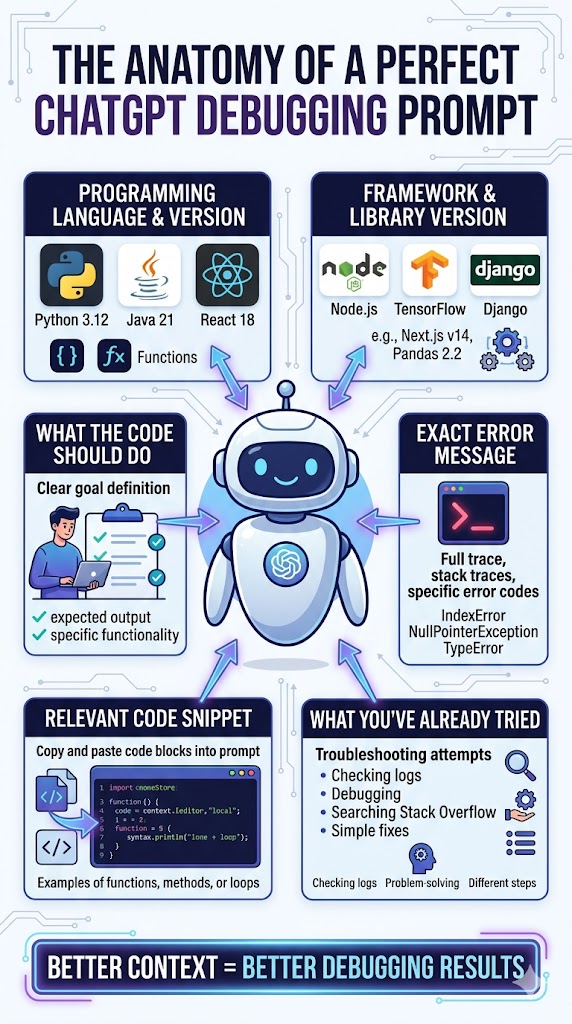
A complete debugging prompt includes:
- The programming language and version
- The framework or library being used and its version
- What the code is supposed to do
- The exact error message (copied, not paraphrased)
- The relevant code block where the error occurs
- What you have already tried
When you include all of this in one prompt, the response you get back is specific, relevant, and directly applicable to your code — not a general tutorial about the error type.
Step 2: Be specific about what kind of help you need
There is a difference between “fix this” and “explain why this is happening and then show me the fix.” The second prompt teaches you something. The first just gives you a patch.
If you are a learner or a student, always ask for the explanation alongside the fix. Understanding why the error happened is what stops it from happening again. This is especially important if you are preparing for interviews — being able to explain your own debugging process is a skill that hiring managers actively test.
Step 3: Use the conversation to iterate
If the first fix does not work, do not start a new chat. Stay in the same conversation and respond with exactly what happened — the new error, the unchanged behavior, or whatever the result was. ChatGPT carries the context of everything discussed so far, which means the next suggestion is informed by everything that came before.
This is something Stack Overflow simply cannot do.
Step 4: Ask ChatGPT to explain the root cause, not just the fix
Once your error is resolved, ask one more question: “Can you explain what was actually causing this, and are there other places in my code where the same issue might appear?”
This single habit — asking for root cause analysis after a fix — is what separates developers who keep fixing the same type of bug from developers who stop making that mistake entirely.
Weak Prompt vs Strong Prompt: A Real Example
Scenario: A React component is not re-rendering when state changes.
Weak prompt: “My React component is not updating. Here is the code. What is wrong?”
This gives ChatGPT almost nothing. The response will be a general checklist of common re-render reasons — not a diagnosis.
Strong prompt: “I am building a React 18 application. My functional component displays a list fetched from an API. It renders correctly on first load, but calling setItems() after a filter operation does not update the UI even though the console log shows the state changed. I am using useState. Here is the component: [code]. Here is the filter function: [code]. What is causing the re-render failure and how do I fix it?”
This gives ChatGPT the version, component type, exact behavior, hook being used, and the actual code. The response will identify whether it is a mutation problem, a reference equality issue, or something else — using your code, not a generic example.
Same tool. Completely different outcome. The difference is the prompt.

Don’t just learn coding—become a developer capable of building complete web applications from front-end to back-end
Types of Bugs Where ChatGPT Outperforms Stack Overflow
Not every bug is equal. Here are the categories where ChatGPT is especially powerful compared to forum-based searching.
Version-specific errors
When a function is deprecated or the behavior changed between versions, Stack Overflow threads are often outdated. ChatGPT can reason about version-specific issues when you tell it what version you are using.
Integration bugs
Errors that happen at the boundary between two systems — your frontend and backend, a third-party API, or two libraries that conflict — are notoriously hard to search for. ChatGPT handles these well because you can describe the full context of both sides.
Logic errors with no error message
Sometimes the code runs fine but produces wrong output. Stack Overflow is nearly useless here because there is nothing to search. ChatGPT can walk through your logic step by step and identify where the calculation or conditional goes wrong.
Async and timing issues
Race conditions, unresolved promises, and incorrect async/await usage are among the trickiest bugs to debug through search. When you show ChatGPT the async flow with full context, it can trace the timing problem in a way no search result can.
MERN stack and Java full stack integration issues
For developers working on full stack projects, bugs often span the backend API, the database query, and the frontend rendering simultaneously. ChatGPT can reason across all three layers when given the relevant code from each.
What ChatGPT Cannot Do — Stay in Control
ChatGPT does not have access to your actual development environment. It works only with what you paste. If the bug is caused by a missing file, a misconfigured server, or a system-level dependency, you need to describe that context explicitly.
Always review AI-generated fixes before implementing them. ChatGPT can occasionally solve the immediate error while introducing a different issue elsewhere, especially in complex codebases. Understanding the fix — not just copying it — is non-negotiable.
Never paste API keys, passwords, proprietary business logic, or private client data into any public AI tool. This is a professional responsibility every developer must take seriously.
Turn your passion for technology into a high-growth career with industry-focused Full Stack Development training
How Learn2Earn Labs Trains Developers to Debug With AI
At Learn2Earn Labs, AI-assisted debugging is not a topic mentioned in passing. It is a practiced, repeatable skill built into the training process from the start.
Students in the Full Stack Web Development (MERN and Java), React Native Mobile App Development, and other technical programs learn how to structure debugging prompts, iterate on AI responses, and evaluate AI-generated fixes critically — not just accept them. This combination of AI fluency and technical judgment is what makes the difference in real projects and in job interviews.
The training goes beyond debugging. Career counselling, mock interviews, live project experience, placement support, and guidance on how to demonstrate AI skills to hiring managers — all of it is part of how Learn2Earn Labs prepares students for actual careers, not just certifications.
With 12+ years of experience and 5000+ alumni placed in companies including TCS, Accenture, Cognizant, and more, the track record speaks directly to what structured, practical training produces.
If you are serious about building development skills that are relevant right now — and learning to use AI tools the way the industry actually expects — visit learntoearnlabs.com or write to team@learntoearnlabs.com to speak with a career counsellor.
Conclusion: Stop Searching. Start Solving.
Stack Overflow is a resource. ChatGPT is a collaborator.
One gives you answers written for someone else’s problem. The other works through your specific problem, in your specific codebase, in a conversation that adapts as the debugging progresses.
The developers learning to use ChatGPT effectively are not just saving time. They are building a faster feedback loop, understanding their errors more deeply, and developing stronger technical instincts — because they get explanations alongside fixes, not just patches.
The skill starts with one habit: write a better prompt. Give context. Be specific. Iterate. Ask why, not just what.
Start doing that on your next bug. The improvement in your development speed will be immediate — and it compounds every single day.
FAQ
Q1. Can ChatGPT debug code better than Stack Overflow?
Answer: ChatGPT can analyze your specific code, error messages, and project context, making debugging faster and more personalized than searching static forum answers.
Q2. What information should I provide ChatGPT when debugging code?
Answer: Include the programming language, framework version, exact error message, relevant code snippets, expected behavior, and troubleshooting steps already attempted.
Q3. Is ChatGPT useful for React debugging?
Answer: Yes. ChatGPT can identify React state management issues, component rendering problems, hook misuse, and version-specific React errors.
Q4. Can ChatGPT help debug Java applications?
Answer: Yes. It can assist with Spring Boot errors, API integration issues, database connectivity problems, and Java exception handling.
Q5. Is ChatGPT a replacement for Stack Overflow?
Answer: Not entirely. Stack Overflow remains valuable for community knowledge, while ChatGPT provides personalized debugging assistance and interactive troubleshooting.