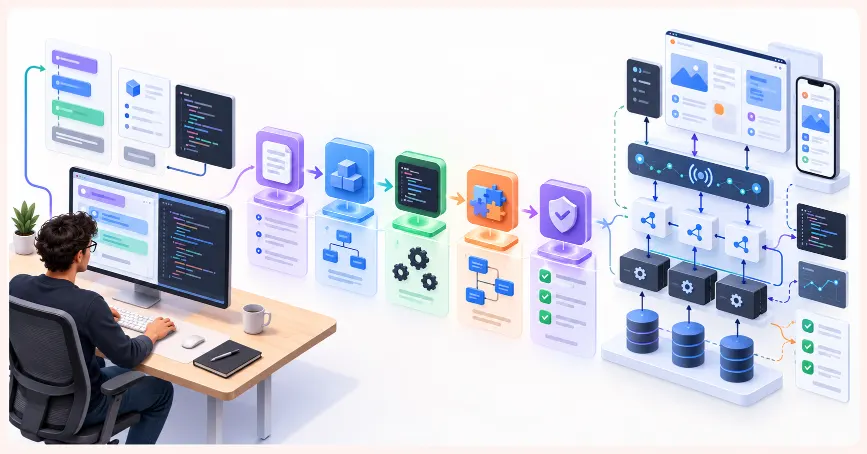
How to Plan Full-Stack Application Architecture With AI Before Writing Code
Table of Contents
ToggleThe most expensive mistake in software development is making architectural decisions too late
Most developers start building before fully thinking through what they are building — not because they are careless, but because the pressure to show progress is immediate and the consequences of architectural decisions feel abstract until the moment they are not.
That moment arrives around week three. The schema that made sense for the first two features does not support the third. The authentication approach does not integrate with role-based access control added later. With working code in the way, refactoring is a week’s work at minimum.
Good architectural planning prevents this by forcing every structural decision to be made explicitly, before any code depends on it, when the cost of changing it is close to zero.
AI has changed what this planning looks like — not by making the decisions, but by making the process faster, more thorough, and more accessible to developers without years of architecture experience. A developer who knows how to use AI for architecture planning can produce, in a few hours, the structured thinking that used to take experienced teams several days.
This blog explains how — prompt by prompt, from the first question to a buildable architecture document.
AI Integrated Digital Marketing Training
Build practical skills in SEO, Google Ads, Social Media Marketing, Analytics, Content Marketing, and AI-powered workflows through projects, live classes, internship exposure, and industry-focused learning.
Why these prompts produce better output than general architecture questions
“What is the best database for a social media app?” produces a general answer that leaves you no closer to a concrete decision for your specific project.
“Given that our app needs flexible schema, real-time WebSocket updates, and geographic search within 10 kilometres, maintained by two developers — evaluate PostgreSQL with PostGIS, MongoDB with geospatial indexes, and Firebase with GeoFirestore” produces something that is actually actionable.
Every prompt in this blog is designed to produce the second kind of output: specific, contextual, and actionable — by providing specific information and structuring the planning so earlier decisions become constraints later prompts build from.
Step 1: define the application requirements with enough specificity to constrain architecture decisions
Vague requirements produce generic architecture. Precise requirements produce specific, actionable recommendations:
I am planning the architecture for a full stack web application.
Application: [2-3 sentence description]
Known requirements:
– Estimated users: [range with year projections]
– Core features: [5-8 key features]
– Real-time requirements: [yes/no and type]
– Authentication: [who can access what]
– Data sensitivity: [PII / financial / health / none]
– Deployment target: [cloud provider, containerised, serverless]
– Team: [size and skill set]
– Budget constraints: [relevant cost considerations]
Ask me the 10-15 most important clarifying questions whose answers will most affect architectural decisions.
After I answer them, generate a complete requirements document as the foundation for all architecture decisions.
This prompt asks AI to identify what it does not know before making recommendations. The clarifying questions often surface requirements the developer had not considered — caching strategy, data retention, international users, API versioning, third-party integrations — and answers to those questions shape every subsequent architectural decision.
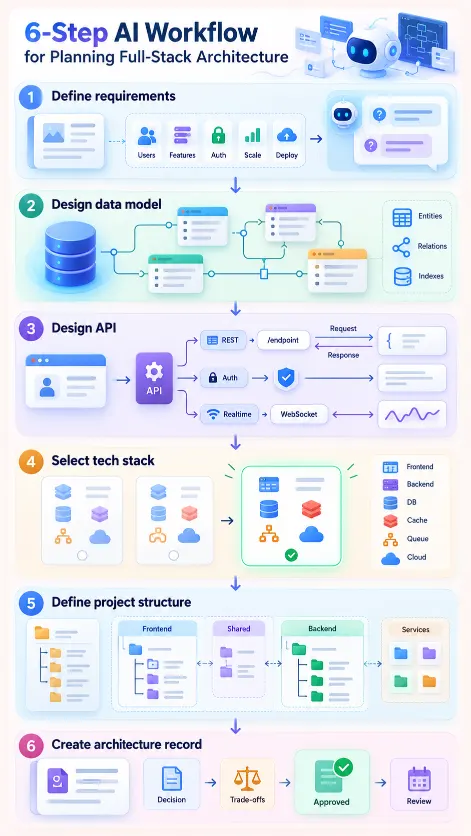
Step 2: design the data model
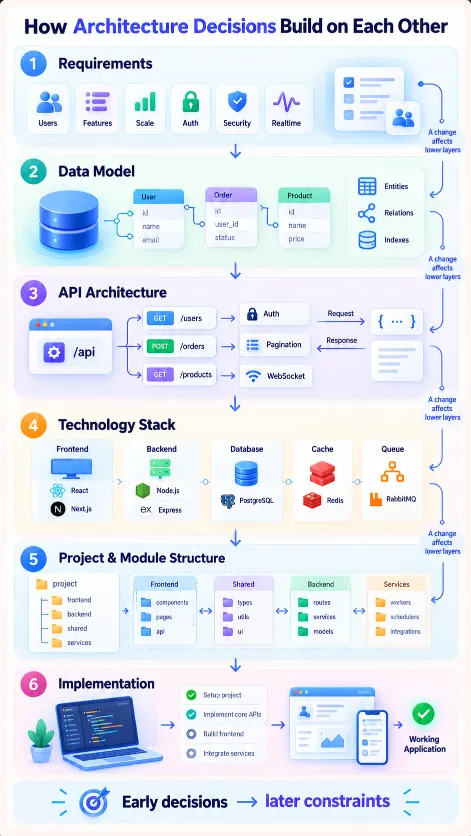
The data model is the first architectural layer to design — every other layer depends on it. The API is shaped by the data. The frontend is shaped by the API. Infrastructure is sized by data volume.
Using the requirements document, design the complete data model.
For each entity:
– Name, purpose, all fields with types and constraints
– Relationships to other entities with storage approach
(foreign key, embedded document, or join table) and justification
– Fields requiring indexes (frequent queries, full-text search)
Also:
- High-volume entities: partitioning/sharding strategy
– Soft delete vs hard delete per entity
– Many-to-many relationships with attributes (need join entities)
– Database type recommendations for heterogeneous storage needs
Produce an entity relationship diagram in text format at the end.
A textual ERD can be pasted into Draw.io, dbdiagram.io, or Lucidchart to produce a visual in minutes. It also serves as a compact reference for the rest of the planning session.
Step 3: design the API architecture
With the data model defined, design the API layer:
Using the data model, define the complete REST API architecture.
For each resource:
– Base path (REST conventions)
– All endpoints: HTTP method, path, authentication requirement,
request body, success response, all error responses
– Pagination approach for list endpoints (cursor-based vs offset-based
with justification for our data volume)
– Filtering and sorting parameters
– Rate limiting recommendations per endpoint group
Also address:
- API versioning strategy
– Response envelope format consistency
– Any endpoints that should be batched to reduce round trips
– Operations better served as WebSocket events than REST endpoints
Produce as an OpenAPI-compatible structure
(full YAML will be generated in a separate step).

AI Integrated Full Stack Development Training
Master HTML, CSS, JavaScript, React, Node.js, Express.js, MongoDB, REST APIs, and AI-powered development workflows through live coding, practical projects, internship opportunities, and career-focused training.
Step 4: select the technology stack with explicit trade-off analysis
With data model and API design established, select the technology stack with specific justification against the requirements, not generic recommendations:
Based on our requirements, data model, and API design,
recommend the complete technology stack. Evaluate top 2-3 options per layer
and recommend one with justification.
Backend:
- Server framework (Node.js/Express, NestJS, Spring Boot, FastAPI — matched to our team skills)
- Primary database with justification
- Caching layer (Redis, Memcached, or none)
- Task queue (BullMQ, RabbitMQ, Kafka, or none — based on async requirements)
Frontend:
- Framework (based on SEO requirements and team skills)
- State management approach (justified against our data complexity)
- Component library recommendation
Infrastructure:
- Hosting with cost estimate at expected scale
- CI/CD recommendation
- Containerisation approach (based on team size)
- Minimum viable observability stack
For each recommendation:
- Primary reason chosen over alternatives
- Trade-offs accepted
- Decision to revisit at 10x current scale
The “decision we might want to revisit at 10x scale” instruction forces the AI to identify scale-limited recommendations — so the team can accept those limits consciously and knows exactly when to revisit them.
Step 5: design the project structure and module boundaries
Technology selected, design the project structure:
Based on our stack, design the complete project structure.
Backend:
- Directory tree to three levels deep
- Purpose of each top-level directory
- Layer responsibilities (routing, validation, business logic,
data access, external services)
- Cross-cutting concerns placement (error handling, logging, auth middleware)
- Environment configuration management
Frontend:
- Directory tree to three levels deep
- Feature organisation: feature-based vs type-based (recommend which)
- Shared components, hooks, utilities, and types locations
- Routing structure and API call encapsulation
Module boundaries:
- Strictly independent modules (extractable to services later)
- Intentionally coupled modules with justification
- Bounded contexts enforced through directory structure
Produce a list of the first 10 tasks in order that establish
the architecture in code before any feature work begins.
The “first 10 tasks in order” output converts a planning document into a development backlog — so the developer opens their IDE knowing exactly what to do first, in what order, and why.
Step 6: produce the architecture decision record
Capture every decision made across the planning session in a structured document that the team can reference throughout the project.
Produce an Architecture Decision Record (ADR) based on our complete planning session.
For each major decision (data model, API design, stack, project structure):
- Decision title
- Context: why this decision needed to be made
- Decision: what was decided
- Rationale: specific reasons chosen over alternatives
- Trade-offs accepted
- Consequences: how this constrains future decisions
- Review trigger: when this decision should be revisited
Format as markdown — ARCHITECTURE.md committed to the repository.
An ADR committed to the repository makes architectural decisions visible to every developer who joins the project later, with the reasoning preserved. Architectural debates caused by a new team member not understanding why something was built a certain way — which take hours to resolve — drop to near zero when the ADR exists.
AI Integrated React Native Mobile App Development Training
Build a job-ready mobile app development profile through practical coding, industry-style projects, AI-assisted workflows, career preparation, mentor-guided learning, real-world app deployment, API integration, and hands-on portfolio development.
How Learn2Earn Labs trains developers to think architecturally from the start
At Learn2Earn Labs, architecture planning is not reserved for senior developers or taught at the end of a program. It is practised from the first multi-component live project — which happens early in the Full Stack Web Development and Java Full Stack programs.
Students use the AI-assisted architecture planning workflow described in this blog to think through data models, API designs, and project structure before writing implementation code. Prompts written for each planning stage are reviewed alongside the implementation — because a student whose code does not match their architecture document has identified either a flaw in the architecture or a deviation that needs justification.
This practice develops two things simultaneously: architectural thinking — the habit of making structural decisions consciously before code creates inertia — and prompt engineering fluency for planning work, which is the type of AI collaboration most developers encounter least in tutorials and most in professional work.
Career counselling prepares students to articulate their architecture decisions in technical interviews — explaining not just what they built but why they made the structural choices they did. This reasoning demonstrates engineering maturity that distinguishes mid-level thinking from junior-level thinking, regardless of professional experience.
With alumni placed at TCS, Accenture, Cognizant, Infosys, and Nagarro, and with decades of experience shaping developer careers across India, Learn2Earn Labs trains every student to build software that is designed before it is coded — and to use AI as the tool that makes that design process faster and more thorough.
Visit learntoearnlabs.com or write to team@learntoearnlabs.com
Conclusion
Architectural decisions made during implementation are expensive. Made before implementation — with full visibility of how each one constrains the next — they are close to free.
AI does not make architectural decisions. But it makes the process dramatically faster, more thorough, and more explicit. A developer who enters a planning session with the prompts in this blog exits with a requirements document, data model, API design, technology stack, project structure, development backlog, and architecture decision record — in a fraction of the time that traditional whiteboarding would take.
Write the architecture. Then write the code.
Frequently Asked Questions
1. Can AI help plan the architecture of a full-stack application?
Yes. AI can help developers structure requirements, explore architectural alternatives, design data models and APIs, evaluate technology choices, define project structure and document architecture decisions. It works best as a planning assistant that evaluates decisions against specific project requirements rather than making architectural decisions without context.
2. What information should I give AI before asking for software architecture recommendations?
Provide specific information about the application, expected users, core features, real-time requirements, authentication, data sensitivity, deployment environment, team skills and budget constraints. Asking AI to identify additional clarifying questions before recommending an architecture can also uncover important requirements that were initially missed.
3. Should the database and data model be designed before the API?
In the workflow described here, yes. The data model is treated as an early architectural layer because API resources and operations depend heavily on how application data, entities and relationships are structured. The API then influences how the frontend interacts with the application.
4. Can AI help choose the right technology stack for a full-stack application?
Yes. AI can compare multiple technologies for each architectural layer against the application’s requirements, team capabilities, expected scale and budget. A useful evaluation should explain why one option is preferred, what trade-offs are being accepted and when the decision may need to be revisited as the application grows.
5. What is an Architecture Decision Record and why should developers create one?
An Architecture Decision Record, or ADR, documents important architectural choices along with their context, rationale, trade-offs, consequences and conditions for future review. Keeping this record with the project helps future developers understand why structural decisions were made rather than seeing only the resulting code.